I used a generator to build a replenishable queue.
Generators can't be resurrected after they've completed. But we can make a replenishable version of them with the help of promises. Let's tinker.
Ever since writing about them, the generator in JavaScript has become my favorite hammer. I'll wield it nearly any chance I can get it. Usually, that looks like rolling through a finite batch of items over time. For example, doing something with a bunch of leap years:
function* generateYears(start = 1900) {
  const currentYear = new Date().getFullYear();

  for (let year = start + 1; year <= currentYear; year++) {
    if (isLeapYear(year)) {
      yield year;
    }
  }
}

for (const year of generateYears()) {
  console.log('the next leap year is:', year);
}
...or lazily processing some files:
const csvFiles = ["file1.csv", "file2.csv", "file3.csv"];

function *processFiles(files) {
  for (const file of files) {
    // load and process files
    yield `the result for: ${file}`;
  }
}

for(const result of processFiles(csvFiles)) {
  console.log(result);
}
In both examples, the pool of items is exhausted once and never replenished. The for loop stops, and the final item returned by the iterator contains done: true. C’est fini.
That behavior makes sense – a generator wasn’t designed to be resurrected after it's completed. It’s a one-way street. But on at least one occasion, I've wanted it to be possible. Most recently, it happened while building a file upload tool for PicPerf. I wanted (read: demanded) to use a generator to power a replenishable, first-in-first-out (FIFO) queue. I did some tinkering, and liked where the effort ended up.
The Makeup of a Replenishable Queue
First, a bit more on what I mean by “replenishable.” A generator can't be turned on again, but we can get around that by holding it open when the queue of items becomes depleted. A great job for promises!
Let's start with this setup: dots in a queue that are individually processed every 500ms.
<html>
  <ul id="queue">
    <li class="item"></li>
    <li class="item"></li>
    <li class="item"></li>
  </ul>

  total processed: <span id="totalProcessed">0</span>
</html>

<script>
  async function* go() {
    // A queue with some initial items.
    const queue = Array.from(document.querySelectorAll("#queue .item"));

    for (const item of queue) {
      yield item;
    }
  }

  // Iterate over each one, removing along the way.
  for await (const value of go()) {
    await new Promise((res) => setTimeout(res, 500));
    value.remove();

    totalProcessed.textContent = Number(totalProcessed.textContent) + 1;
  }
</script>
Here's our one-way queue:
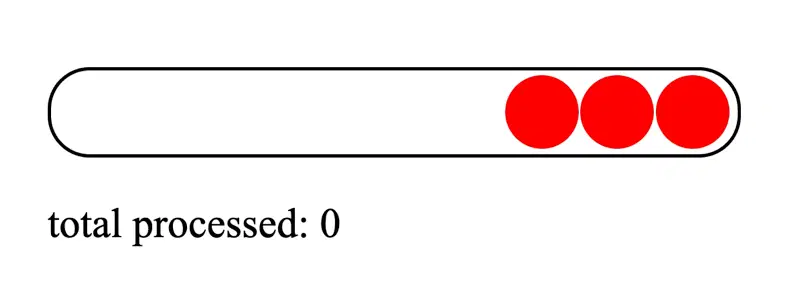
If we had a button for pushing items to the queue, and it were clicked after the generator had completed, nothing would happen. It's dead. So, let's do some refactoring.
Making It Replenishable
First, we'll allow the loop to run indefinitely using while(true), rather than directly depending on whatever's available in the queue.
async function* go() {
  const queue = Array.from(document.querySelectorAll("#queue .item"));

  while (true) {
    if (!queue.length) {
      return;
    }

    yield queue.shift();
  }
}
The one remaining problem is that return statement. We'll replace it with a promise to pause the loop until we have more items to process:
let resolve = () => {};
const queue = Array.from(document.querySelectorAll('#queue .item'));

async function* go() {
  while (true) {
    // Create a promise & set our
    // resolver for this iteration of the generator.
    const promise = new Promise((res) => (resolve = res));

    // No items... wait until our promise is resolved.
    if (!queue.length) await promise;

    yield queue.shift();
  }
}

addToQueueButton.addEventListener("click", () => {
  const newElement = document.createElement("li");
  newElement.classList.add("item");
  queueElement.appendChild(newElement);

  // Add new item and reignite the queue!
  queue.push(newElement);
  resolve();
});

// ...the rest of the code.
This time around, a new promise is created for every item. If there aren't any items to process, that promise will be await-ed until some indeterminate point in the future. For us, that's whenever the button is clicked, adding a new item to the queue.
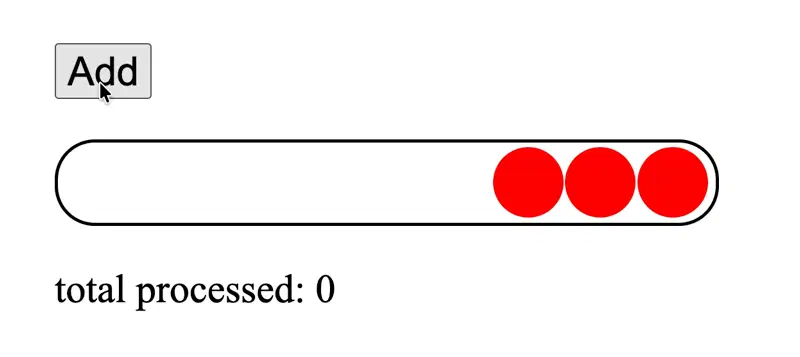
For some finishing touches, let's put it behind a prettier API.
function buildQueue<T>(queue: T[] = []) {
  let resolve: VoidFunction = () => {};

  async function* go() {
    while (true) {
      const promise = new Promise((res) => (resolve = res));

      if (!queue.length) await promise;

      yield queue.shift();
    }
  }

  function push(items: T[]) {
    queue.push(...items);

    resolve();
  }

  return {
    go,
    push,
  };
}
One quick call-out about this: you don't have to discard every item from the queue. If you'd like them all to stick around, just pivot to a version using a pointer:
async function* go() {
  let currentIndex = 0;

  while (true) {
    const promise = new Promise((res) => (resolve = res));

    if (!queue[currentIndex]) await promise;

    yield queue[currentIndex];
    currentIndex++;
  }
}
Good job, us! Now, let's head back to the real world.
Using It In React
Like I mentioned, PicPerf allows you to upload a bunch of images to be optimized, hosted, and cached. The UI follows a common pattern: drag things in and they'll get progressively uploaded.

This is where I wanted my first-in-first-out queue. If the pool of ”pending” images has been depleted, I should still be able to drag in more images and see the process continue. The queue would simply pick back up with the new set of items.
Building it in React
First, let's try our hand with a React-first approach. We'll lean hard into React's state + render lifecycle, depending on two pieces of state:
files: UploadedFile[]- this represents every file dragged into the UI. Each of these items manages its own status:pending,uploading, orcompleted.isUploading: boolean- a flag for storing whether we're currently uploading a file. This'll be used as a lock, preventing another upload loop from beginning while there's one already in progress.
This version of the component works by watching whether anything has been added to files. As soon as it gets something, useEffect() kicks off the upload process. Toggling isUploading back to false will trigger another effect, causing the next image in the queue to be handled.
Here's a stripped down, contrived example of how it's structured.
import { processUpload } from './wherever';

export default function MediaUpload() {
  const [files, setFiles] = useState([]);
  const [isUploading, setIsUploading] = useState(false);

  const updateFileStatus = useEffectEvent((id, status) => {
    setFiles((prev) =>
      prev.map((file) => (file.id === id ? { ...file, status } : file))
    );
  });

  useEffect(() => {
    if (isUploading) return;

    const nextPending = files.find((f) => f.status === 'pending');

    if (!nextPending) return;

    setIsUploading(true);
    updateFileStatus(nextPending.id, 'uploading');

    processUpload(nextPending).then(() => {
      updateFileStatus(nextPending.id, 'complete');
      setIsUploading(false);
    });
  }, [files, isUploading]);

  return <UploadComponent files={files} setFiles={setFiles} />;
}
While there's an outstanding upload, we're still fully able to add new files as we wait. They'll just be tacked onto the overall list, and processed incrementally:

In terms of React component design, this isn't the worst tactic in the world. It's common to listen for state changes like this, and then respond accordingly.
Still... I think you'd be hard-pressed to find an honest person who finds the approach intuitive. The useEffect() hook is intended to synchronize a component with an external system. But this is acting more like an event-driven state machine orchestration thing. That hook is core to the behavior of the component.
Let's remedy that by swapping out all those effects for a generator-powered queue.
Syncing to an External Store
Rather than allowing React to own the entire list of files and their statuses, we'll pull them out and signal re-renders to occur from a different location. That'll make our component a little more "dumb" and focused on what its ultimate purpose is: render some UI.
To do this, React comes with a tool that fits our circumstances nicely: useSyncExternalStore(). This enables a component to listen for changes to data managed elsewhere. In a way, the "React-ness" of the component takes a bit of a backseat and waits for instructions from afar, rather than wholly owning the state itself. In our case, the "external store" will be a separate module responsible for processing our files.
At bare minimum, useSyncExternalStore() requires two functions: one for listening for changes to the relevant data (used to know when a component relying on the store should be re-rendered), and another for returning the latest version of that data. Here's our skeleton:
// store.ts

let listeners: Function[] = [];
let files: UploadableFile[] = [];

// *Must* return a function for unsubscribing the listener.
// (Used internally by React.)
export function subscribe(listener: Function) {
  listeners.push(listener);

  return () => {
    listeners = listeners.filter((l) => l !== listener);
  };
}

export function getSnapshot() {
  return files;
}
Now, let's quickly fill in the other functions needed to make this work:
updateStatus()- Used to set whether a file is waiting, being currently uploaded, or finished.add()- Places new files onto the queue.process()- Kicks everything off and runs through the queue.emitChange()- Tells React's listeners that a change has occurred and components should be updated.
In all, here's the state of the store:
// store.ts

import { buildQueue, processUpload } from './whatever';

let listeners: Function[] = [];
let files: any[] = [];
const queue = buildQueue();

function emitChange() {
  // Quirk of using an external store:
  // our `files` must point to a new
  // reference when a change occurs.
  files = [...queue.queue];

  for (let listener of listeners) {
    listener();
  }
}

function updateStatus(file: any, status: string) {
  file.status = status;
  emitChange();
}

// ===
// "Public" functions:
// ===

export function getSnapshot() {
  return files;
}

export function subscribe(listener: Function) {
  listeners.push(listener);

  return () => {
    listeners = listeners.filter((l) => l !== listener);
  };
}

export function add(newFiles: any[]) {
  queue.push(newFiles);
  emitChange();
}

export async function process() {
  for await (const file of queue.go()) {
    updateStatus(file, 'uploading');

    await processUpload(file);

    updateStatus(file, 'complete');
  }
}
Now, our component can take on a different shape:
import {
  add,
  process,
  subscribe,
  getSnapshot
} from './store';

export default function MediaUpload() {
  const files = useSyncExternalStore(subscribe, getSnapshot);

  useEffect(() => {
    process();
  }, []);

  return <UploadComponent files={files} setFiles={add} />;
}
There's just one piece we're missing: proper clean-up. In the event that the component unmounts, we don't want any lingering upload processes. Let's add an abort() method to force the generator to wrap up, and stick it into our useEffect():
// store.ts

// ...other stuff.

let iterator = null;

export async function process() {
  iterator = queue.go();

  for await (const file of iterator) {
    updateStatus(file, 'uploading');

    await processUpload(file);

    updateStatus(file, 'complete');
  }

  iterator = null;
}

export function abort() {
  return iterator?.return();
}
function MediaUpload() {
const files = useSyncExternalStore(subscribe, getSnapshot);
useEffect(() => {
process();
return () => abort();
}, []);
return <UploadComponent files={files} setFiles={add} />;
}There are some bold assumptions we're making here for the sake of simplicity, by the way. Among them: the upload process will never fail, process() will only ever be called once at a time, and there's only one user of the store). Forgive all those things and whatever else I might've missed. The point is the bag of gains we get from this approach:
- The component's behavior no longer relies on repeated
useEffect()triggers. - All the file upload business is abstracted away into its own, React-free module.
- You finally had a reason to leverage
useSyncExternalStore(). - We can gloat about how we implemented a replenishable queue with an async generator in React.
To some, this probably feels way more complicated than that "React-ish" route we initially took. I totally get that. But consider this: the more complicated we make our code now, the longer we hold off AI agents from wholly displacing us, killing our futures, and harvesting our organs. Build with that in mind!
But for real: for AI-assisted engineering to continue to be valuable, it'll need humans to help it understand the purposes, trade-offs, and futures of underlying primitives. There'll always be value in mastering that.
Get blog posts like this in your inbox.
May be irregular. Unsubscribe whenever.